How to Know If Your Hardware Is Banned in Rust
Learn how to determine if your hardware has been banned from Rust, what HWID bans mean, signs you might see, and practical steps to verify status and request a review.


If your hardware has been banned in Rust, you won’t be able to join servers or access the game with that hardware. Signs include consistent login failures, ban messages tied to hardware, and inability to create new accounts on the same device. Use official support to confirm status and start an appeal if needed.
What hardware bans mean for Rust players
In Rust, a hardware ban is a security action tied to your device rather than to a specific account. When anti-cheat systems detect behavior that violates rules on a particular machine, they can prevent that device from launching Rust, even if you switch to a different account. This distinction matters: account bans block a profile, while hardware bans block the hardware itself. For DIY players, understanding this difference helps you plan next steps without compromising privacy or breaking rules. Anti-cheat policies are designed to protect fair play and the integrity of the game world, but they must align with platform guidelines and local laws. If you suspect a block, approach the situation calmly and rely on official channels for clarity rather than rumor.
According to Corrosion Expert, many players underestimate how HWID-level enforcement can impact access across multiple accounts on the same device, so a careful verification process is essential.
How anti-cheat systems detect hardware bans and enforce them
Modern anti-cheat solutions increasingly use hardware fingerprinting to identify devices. They can collect non-identifying data about your setup—such as motherboard model, CPU family, GPU IDs, and BIOS/UEFI details—to create a unique device profile. When a banned device attempts to authenticate, the system cross-references that profile with ban lists. If there is a match, access is blocked at the hardware level, not solely by your game account. The exact policies differ by platform and region, and some implementations require re-authentication or a full reinstall to test whether the block is device-based. For privacy-conscious players, it’s important to understand what data is collected and how it’s used; reviewing the privacy policy and requesting data access or a summary of collected identifiers is reasonable.
Signs you might be hardware-banned in Rust
There are several indicators that point to a device ban rather than an ordinary account issue. You may see a hardware-ban message or login denial even when using a fresh account. Replacing or swapping usernames on the same device often does not restore access if the hardware identity remains constant. If you’re blocked from servers consistently without standard account-level penalties, that could signal a device ban. Be mindful that some errors are generic and could resemble common login problems. When in doubt, contact official support to confirm status and compare with experiences from other players.
Step-by-step process to determine your status
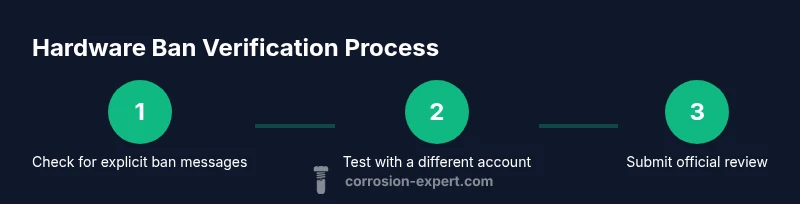
Start with the simplest checks first and build a concise case. Look for explicit ban notifications and note any reference to hardware or device. Test login with a different account on the same device to see if access remains blocked, which strongly suggests device-level enforcement. Gather hardware identifiers (CPU ID, motherboard model, BIOS version, GPU IDs) using system tools or reputable software, but share only what is needed for the review. Finally, contact official Rust support or the platform’s anti-cheat team with a short, factual report that includes your identifiers, dates of attempted access, and any error messages. Documentation and timing are key; avoid exposing sensitive data in public forums.
What to do if you believe there is an error
If you suspect a misidentification, begin with a calm, structured appeal. Prepare a brief timeline of events, include your hardware identifiers, and attach any relevant logs or screenshots showing the errors you encountered. Use the official support form, not third-party forums, to request a review. Be concise and avoid duplicative submissions; multiple follow-ups can delay resolution. If the ban is upheld, ask for a clear explanation of the policy and what steps would be needed to rectify the situation. Remember to respect privacy and data-sharing rules during this process.
Privacy, safety, and best practices when dealing with bans
Protect your personal data while pursuing a review. Only share necessary hardware identifiers and account details with official support channels. Disable any insecure data transfers and avoid sharing identifiers in public spaces. If you do decide to upgrade or replace components, do so legitimately and maintain a record of changes to support your case. Practicing good privacy hygiene helps prevent data misuse and keeps your hardware details safe during the review process.
Common myths about hardware bans in Rust
A frequent myth is that hardware bans are perfectly reversible or that buying a new PC automatically clears the ban. In reality, many anti-cheat systems rely on device fingerprints that persist across hardware changes, and reversals require an official review. Another misconception is that you can simply circumvent a ban by using a different Steam account; if the device remains flagged, the ban may carry over. Rely on official guidance, document your case carefully, and avoid any attempts to evade enforcement, which can lead to additional penalties.
Tools & Materials
- Steam account with Rust access(Your profile status may affect game access; ensure you can log in.)
- HWID/hardware identifiers retrieval tool(Collect CPU ID, motherboard serial, GPU IDs; use reputable software.)
- Official Rust support/Facepunch contact form(Submit a ban review request; include case numbers if provided.)
- Evidence log template(Record error messages, timestamps, and steps taken.)
- Web browser and email access(For official correspondence and updates.)
Steps
Estimated time: 60-120 minutes + 3-7 days for review
- 1
Check for a direct ban notice
Open Steam, launch Rust, and look for any explicit ban messages or error codes. Note the exact wording and where it appears (login screen, launcher, or in-game). This establishes the starting point for your investigation.
Tip: Take clear screenshots of any ban message and timestamp the capture for your records. - 2
Test with a different account on the same device
Attempt to log in with another Steam account on the same machine. If the second account is also blocked, the issue may be hardware-based rather than tied to a single account.
Tip: Don’t use accounts you value for long-term testing; use a temporary or test account to avoid losing access. - 3
Gather hardware identifiers and system details
Collect identifiers such as CPU ID, motherboard model, BIOS/UEFI version, and GPU IDs from your PC. Record basic OS information and any recent hardware changes. Store these securely for the review.
Tip: Only share identifiers required by support; avoid exposing full serial numbers publicly. - 4
Submit a formal review request through official channels
Fill out the official support form with a concise report, attach your hardware IDs, error messages, and a brief timeline of events. Keep your language factual and polite to improve reception.
Tip: Include a brief, factual summary of why you believe the ban might be mistaken and what you’re prepared to provide. - 5
Monitor progress and respond to requests for information
Check your email and the support portal for updates. Support teams may request additional logs or verification steps; respond promptly but only with relevant information.
Tip: Set reminders for follow-ups and avoid submitting multiple requests for the same issue.
Quick Answers
What is a hardware ban in Rust?
A hardware ban targets your device identifiers rather than a single account, potentially blocking access even with a new account. It is enforced by the game’s anti-cheat system.
A hardware ban blocks your device and can affect any account on that machine. You’ll need an official review to address it.
How can I confirm if the ban is hardware-based?
Look for login issues across accounts on the same device and ask official support to confirm whether hardware identifiers are involved.
If you can’t log in with any account on that device, contact support to confirm hardware involvement.
Can I appeal a hardware ban?
Yes. Use the official support form, attach relevant hardware IDs and logs, and present a clear explanation. Timelines vary by case.
You can appeal through the official form; include evidence and stay patient during the review.
What should I prepare before appealing?
Collect hardware IDs, account information, timestamps, and screenshots of error messages. Write a concise summary of events and what you’re requesting.
Gather IDs, dates, and screenshots to support your appeal.
How long does a review take?
Review times vary; expect several days to weeks depending on case complexity. Avoid submitting duplicate requests.
Responses can take days; stay patient and provide any requested information promptly.
Watch Video
Quick Summary
- Identify whether the ban is hardware-based or account-based.
- Collect hardware IDs and relevant logs before appealing.
- Submit a structured, evidence-backed appeal through official channels.
- Expect review times that can span days; stay patient and responsive.